
Mifos Implementation Checklist: Complete Project Planning Guide for Financial Institutions
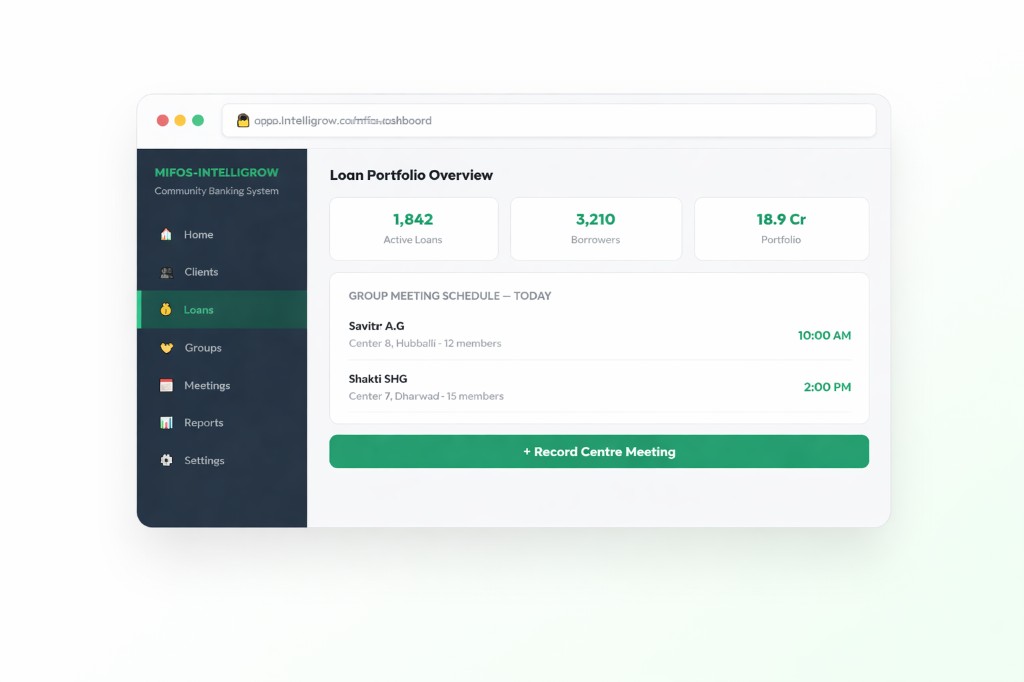
Mifos Implementation Checklist: Complete Project Planning Guide for Financial Institutions
Implementing a Core Banking System is a major milestone for any financial institution. Whether you're a Bank, NBFC, Microfinance Institution (MFI), SACCO, Cooperative Society, Credit Union, or FinTech company, the success of your digital transformation depends on careful planning, strong project governance, and the right implementation strategy.
Mifos, built on the robust Apache Fineract platform, has become one of the most trusted open-source core banking solutions for financial institutions worldwide. Its flexibility, scalability, and modular architecture make it an excellent choice for organizations looking to modernize lending, savings, deposits, and financial operations. However, implementing Mifos is much more than installing software—it involves aligning business processes, configuring financial products, migrating historical data, integrating third-party services, training users, and ensuring regulatory compliance.
Organizations that follow a structured implementation roadmap are significantly more likely to complete projects on time, stay within budget, and achieve faster user adoption. Without a comprehensive checklist, even small oversights can lead to project delays, data inconsistencies, security vulnerabilities, or operational disruptions after go-live.
This guide provides a complete Mifos Implementation Checklist to help your organization navigate every stage of deployment—from initial planning to production rollout—while minimizing risks and maximizing return on investment.
Why Every Mifos Implementation Needs a Checklist
Many organizations assume that implementing a core banking solution is primarily a technical activity. In reality, successful implementation requires collaboration between business teams, technical experts, operations staff, finance departments, compliance officers, and executive management.
A well-defined implementation checklist provides a structured approach that ensures every critical activity is completed before moving to the next stage.
Some of the major benefits include:
- Better project planning
- Reduced implementation risks
- Improved collaboration between departments
- Faster deployment timelines
- Higher data accuracy
- Stronger security controls
- Easier regulatory compliance
- Better customer experience after deployment
Financial institutions planning a new deployment should begin by understanding the complete implementation lifecycle and evaluating their business requirements.
Internal Link:
https://intelligrow.co/mifos-implementation/
Phase 1: Define Business Objectives
Every successful implementation starts with understanding why the project is being initiated.
Before discussing infrastructure or software configuration, organizations should identify their long-term business objectives.
Important questions include:
- What operational challenges are we trying to solve?
- Which lending products will be offered?
- Will savings and deposit products be included?
- How many branches will use the system?
- What reporting requirements exist?
- Which compliance regulations must be followed?
- What customer experience improvements are expected?
- Which existing systems need integration?
A clearly documented business requirement document (BRD) becomes the foundation for every subsequent implementation activity.
During this phase, many organizations engage experienced consultants to conduct workshops, identify gaps, and recommend the best deployment strategy.
Internal Link:
https://intelligrow.co/mifos-consulting/
Phase 2: Build the Right Implementation Team
Technology alone does not determine project success. People do.
A successful Mifos implementation requires collaboration between technical teams and business users who understand day-to-day banking operations.
Your project team should include:
Executive Sponsor
Provides strategic direction and approves budgets.
Project Manager
Coordinates project timelines, resources, and communication.
Business Analysts
Translate operational requirements into functional specifications.
Infrastructure Engineers
Prepare servers, databases, networking, and cloud resources.
Database Administrators
Configure, optimize, and secure the production database.
Compliance Officers
Ensure adherence to banking regulations and audit requirements.
Operations Team
Validate business workflows and operational processes.
Loan Officers
Verify loan origination, approvals, repayments, and collections.
Finance Team
Configure accounting rules, GL mappings, and financial reports.
Implementation Partner
Provides technical expertise, product configuration, customization, and deployment support.
Assigning clear responsibilities early in the project reduces confusion and improves accountability throughout implementation.
Phase 3: Infrastructure Planning
Infrastructure planning directly impacts system performance, availability, and future scalability.
Organizations should decide whether they will deploy Mifos using:
- Public Cloud
- Private Cloud
- Hybrid Cloud
- On-Premise Infrastructure
Each deployment model offers different advantages depending on organizational size, compliance requirements, and budget.
Your infrastructure checklist should include:
✅ Application Server
✅ Database Server
✅ Storage Planning
✅ Network Architecture
✅ Load Balancer
✅ Firewall Configuration
✅ SSL Certificates
✅ Backup Infrastructure
✅ Disaster Recovery Plan
✅ High Availability Setup
✅ Monitoring Tools
Modern cloud deployments offer greater flexibility, automatic scaling, and reduced maintenance costs compared to traditional on-premise environments. Selecting the right infrastructure at the beginning prevents costly migrations in the future.
Phase 4: Install Apache Fineract and Mifos
Once infrastructure is ready, the next step is installing the application environment.
A typical deployment includes:
- Linux Server
- Java Runtime Environment
- Apache Tomcat
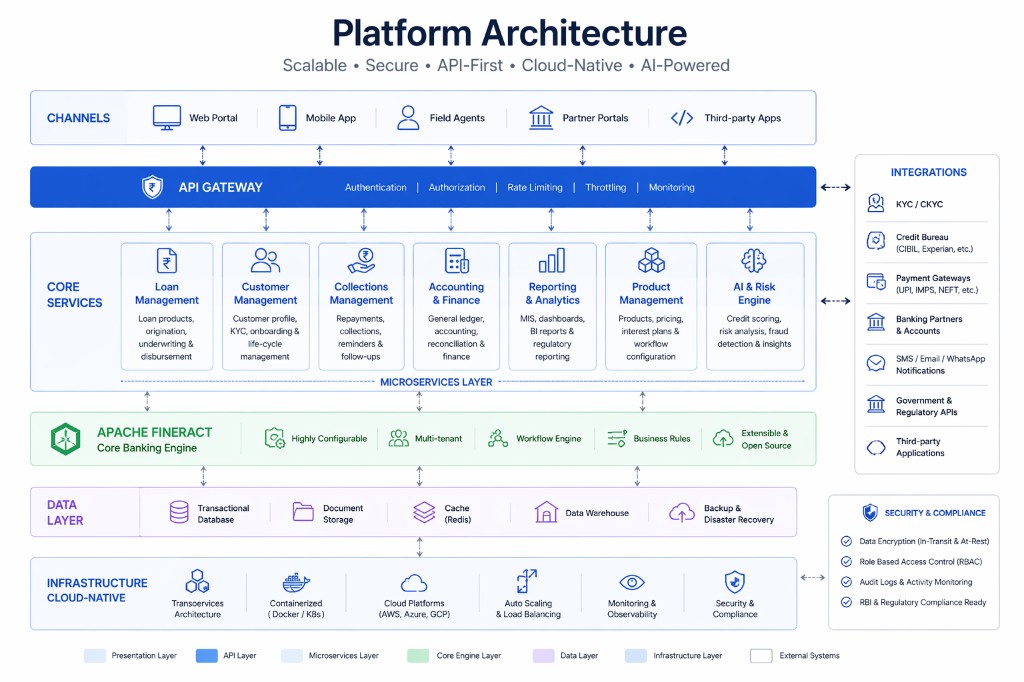
- Apache Fineract
- PostgreSQL or MySQL Database
- Mifos User Interface
- Reverse Proxy
- SSL Configuration
- Logging Services
After installation, verify the following:
- Database connectivity
- API accessibility
- User authentication
- Application performance
- HTTPS security
- Role-based permissions
- Scheduled backups
Organizations with unique operational workflows often require additional development during this stage to support custom business processes, reports, dashboards, or product configurations.
Internal Link:
https://intelligrow.co/mifos-development/
Phase 5: Configure Financial Products
Every financial institution offers different financial products and services.
Before users begin working with Mifos, each product must be configured accurately.
Typical loan products include:
- Personal Loans
- Gold Loans
- Agricultural Loans
- Business Loans
- Vehicle Loans
- Housing Loans
- Group Lending
- Microfinance Loans
Savings products may include:
- Savings Accounts
- Fixed Deposits
- Recurring Deposits
- Pigmy Savings
- Daily Collection Accounts
Additional configurations include:
- Interest calculation methods
- Processing fees
- Late payment penalties
- Repayment schedules
- Accounting rules
- General Ledger mappings
- Branch hierarchy
- User roles and permissions
Because every financial institution has unique operational processes, many organizations choose to customize Mifos rather than relying solely on the default configuration.
Internal Link:
https://intelligrow.co/mifos-customization/
Phase 6: Data Migration Planning
Data migration is one of the most sensitive phases of any implementation. Even a small error can impact customer records, loan balances, repayment schedules, financial reporting, and regulatory compliance.
Before migration begins, perform a comprehensive data assessment.
Your migration checklist should include:
- Remove duplicate customer records
- Standardize customer information
- Verify KYC details
- Validate active loan accounts
- Reconcile outstanding balances
- Clean inactive accounts
- Review historical transactions
- Validate branch information
- Verify user accounts and permissions
Typical migration includes:
- Customer Profiles
- Loan Accounts
- Savings Accounts
- Fixed Deposits
- Repayment Schedules
- Transaction History
- Branch Information
- Employee Records
- User Roles
- Accounting Data
A best practice is to perform multiple trial migrations in a testing environment before the final production migration. This helps identify inconsistencies early and minimizes downtime during go-live.
Internal Link:
https://intelligrow.co/mifos-migration/
Phase 7: API Integration Checklist
Modern financial institutions rely on multiple digital systems to deliver seamless customer experiences. A successful Mifos implementation should not operate in isolation—it must integrate with various third-party applications that support lending, payments, compliance, customer communication, and reporting.
Before going live, identify every external system that needs to exchange information with Mifos.
Common integrations include:
- eKYC Platforms
- Aadhaar Verification
- PAN Verification
- Credit Bureau Services
- Payment Gateways
- SMS Gateway
- Email Services
- ERP Systems
- CRM Platforms
- Mobile Banking Applications
- Internet Banking
- Accounting Software
- Digital Signature Providers
- Collection Applications
For each integration, verify the following:
✅ API documentation is available.
✅ Authentication methods are configured securely.
✅ API response times meet business requirements.
✅ Error handling is implemented.
✅ Retry mechanisms are configured.
✅ Logging and monitoring are enabled.
✅ Security testing has been completed.
Poor API planning often becomes one of the biggest causes of implementation delays. Financial institutions should document every integration point before development begins and perform end-to-end testing with real business scenarios.
Organizations requiring complex banking integrations should work with experienced implementation specialists.
Internal Link:
https://intelligrow.co/mifos-integration/
Phase 8: Security Configuration Checklist
Banks and financial institutions manage highly sensitive customer information, making security one of the most critical aspects of any Mifos implementation.
Security should never be treated as an afterthought.
Every deployment should include multiple layers of protection.
Infrastructure Security
- Configure Firewall Rules
- Enable HTTPS
- Install SSL Certificates
- Restrict Public Server Access
- Disable Unused Ports
Application Security
- Strong Password Policies
- Multi-Factor Authentication
- Session Timeout
- CAPTCHA (where applicable)
- Secure API Authentication
Database Security
- Database Encryption
- Regular Backups
- Backup Encryption
- Database Access Restrictions
- Audit Logging
User Security
- Role-Based Access Control (RBAC)
- Least Privilege Principle
- Periodic Access Reviews
- User Activity Logs
Compliance Checklist
- Audit Trails Enabled
- Regulatory Reporting Configured
- Customer Data Protection
- Data Retention Policies
- Disaster Recovery Procedures
Financial institutions should also conduct penetration testing and vulnerability assessments before production deployment to identify potential weaknesses.
Phase 9: User Acceptance Testing (UAT)
Testing determines whether the implemented solution actually supports day-to-day business operations.
Many organizations rush through this phase, only to discover issues after go-live.
User Acceptance Testing should involve actual business users—not only developers.
Test every major business process, including:
Customer Management
- Customer Registration
- KYC Verification
- Customer Updates
- Customer Search
Loan Management
- Loan Application
- Loan Approval
- Loan Disbursement
- EMI Calculation
- Loan Restructuring
- Loan Closure
Savings Management
- Account Opening
- Cash Deposit
- Cash Withdrawal
- Interest Posting
- Account Closure
Accounting
- General Ledger Posting
- Trial Balance
- Financial Reports
- Cash Reconciliation
Reports
- Loan Portfolio Reports
- Collection Reports
- Customer Reports
- Branch Reports
- Regulatory Reports
Every defect identified during UAT should be documented, prioritized, resolved, and retested before production deployment.
Phase 10: Performance Testing
Performance testing ensures the application remains stable during heavy workloads.
Financial institutions should simulate real-world business conditions.
Test scenarios include:
- Multiple concurrent users
- Bulk transaction processing
- End-of-day processing
- Interest calculation
- Large report generation
- Database performance
- API response times
- Backup execution
Performance metrics should include:
- CPU Usage
- Memory Utilization
- Database Response Time
- Application Response Time
- Network Latency
- Transaction Throughput
Identifying bottlenecks before production prevents service interruptions later.
Phase 11: Staff Training
Technology is only effective when users understand how to use it efficiently.
A comprehensive training program significantly improves user adoption and reduces operational errors.
Training should be conducted separately for different user groups.
Branch Staff
- Customer Registration
- Deposits
- Withdrawals
- Daily Transactions
Loan Officers
- Loan Applications
- Credit Assessment
- Loan Approval
- Collections
- Delinquency Management
Finance Team
- Accounting Entries
- Financial Reports
- Reconciliation
- Audit Reports
System Administrators
- User Management
- Product Configuration
- Security Settings
- Backup & Restore
- Monitoring
Organizations should also provide:
- User Manuals
- Video Tutorials
- Standard Operating Procedures
- FAQ Documents
Ongoing technical assistance after deployment helps users resolve issues quickly.
Internal Link:
https://intelligrow.co/mifos-support/
Phase 12: Go-Live Readiness Checklist
Before moving to production, verify that every implementation activity has been completed successfully.
Business Checklist
✔ Business Requirements Approved
✔ Financial Products Configured
✔ Reports Verified
✔ User Roles Created
✔ Approval Workflows Configured
Technical Checklist
✔ Production Server Ready
✔ SSL Installed
✔ Database Optimized
✔ APIs Tested
✔ Backup Completed
✔ Disaster Recovery Tested
Data Checklist
✔ Customer Data Migrated
✔ Loan Data Verified
✔ Savings Accounts Verified
✔ Transactions Validated
✔ GL Balances Matched
Security Checklist
✔ User Permissions Verified
✔ Audit Logs Enabled
✔ Encryption Configured
✔ Firewall Rules Applied
✔ Password Policy Enabled
Operational Checklist
✔ Staff Training Completed
✔ Support Team Available
✔ Escalation Matrix Prepared
✔ Monitoring Tools Configured
✔ Go-Live Approval Received
A successful go-live is not the end of the project—it marks the beginning of production operations. The first few weeks after deployment require close monitoring to quickly resolve any issues and ensure business continuity.
Common Mifos Implementation Mistakes to Avoid
Even with a well-planned implementation strategy, organizations often encounter challenges that delay deployment or impact system performance. Most implementation failures are not caused by the Mifos platform itself but by inadequate planning, poor communication, insufficient testing, or incomplete data preparation.
Understanding these common mistakes can help your organization proactively mitigate risks and ensure a successful implementation.
1. Incomplete Business Requirement Analysis
One of the most common mistakes is starting the implementation without clearly understanding business objectives. Organizations often focus on software installation before documenting operational workflows, lending processes, reporting requirements, and compliance needs.
This can result in frequent changes during implementation, increasing both project timelines and costs.
2. Poor Data Quality
Migrating inaccurate or duplicate customer records can create long-term operational issues.
Common data migration mistakes include:
- Duplicate customer profiles
- Incorrect loan balances
- Missing repayment schedules
- Invalid KYC information
- Inconsistent branch codes
Always perform multiple rounds of data validation before production migration.
3. Underestimating Customization Requirements
Every financial institution operates differently. Assuming the default Mifos configuration will satisfy every business process often leads to frustration after deployment.
Evaluate customization requirements early in the project.
Internal Link:
https://intelligrow.co/mifos-customization/
4. Ignoring Performance Testing
Many organizations only perform functional testing.
However, production environments may involve:
- Thousands of daily transactions
- Hundreds of concurrent users
- Large loan portfolios
- Complex financial reports
Without performance testing, response times may degrade significantly after go-live.
5. Inadequate User Training
Even the best banking software cannot succeed if users are not confident using it.
Common training gaps include:
- Loan processing
- Customer onboarding
- Savings transactions
- Report generation
- Approval workflows
Continuous training and post-go-live support significantly improve user adoption.
Internal Link:
https://intelligrow.co/mifos-support/
Mifos Implementation Best Practices
Organizations that consistently achieve successful Mifos implementations follow a set of proven best practices.
Start with Clear Business Goals
Every implementation should begin with measurable business objectives.
Examples include:
- Reduce loan approval time by 50%
- Automate manual processes
- Improve reporting accuracy
- Enhance customer experience
- Increase operational efficiency
Choose the Right Implementation Partner
Working with experienced implementation specialists reduces project risk and accelerates deployment.
An experienced partner can help with:
- Business analysis
- Product configuration
- Infrastructure planning
- Data migration
- API integration
- Security
- User training
Internal Link:
https://intelligrow.co/mifos-consulting/
Use a Staging Environment
Never configure or test directly in production.
Maintain separate environments for:
- Development
- Testing
- User Acceptance Testing (UAT)
- Production
This minimizes operational risks during implementation.
Automate Backups
Automated backups should be configured before production deployment.
Backup strategy should include:
- Daily database backup
- Weekly full server backup
- Monthly archive backup
- Offsite backup storage
Regularly test backup restoration procedures.
Monitor the System Continuously
Monitoring helps identify issues before users experience service disruptions.
Track metrics such as:
- CPU utilization
- Memory usage
- Database performance
- API response times
- Error logs
- Network traffic
Plan for Future Growth
Your implementation should support future expansion.
Consider:
- Additional branches
- Increased transaction volumes
- Mobile banking
- Digital lending
- New financial products
- Regulatory changes
Scalable architecture reduces future implementation costs.
Complete Mifos Implementation Checklist
| PhaseStatus | |
| Business Requirements Document Completed | ☐ |
| Project Team Established | ☐ |
| Infrastructure Ready | ☐ |
| Server Installation Completed | ☐ |
| Apache Fineract Installed | ☐ |
| Mifos Installed | ☐ |
| Financial Products Configured | ☐ |
| User Roles Created | ☐ |
| Branch Structure Configured | ☐ |
| Customer Data Cleaned | ☐ |
| Trial Data Migration Completed | ☐ |
| Production Data Migration Completed | ☐ |
| API Integrations Tested | ☐ |
| Security Configuration Verified | ☐ |
| SSL Certificates Installed | ☐ |
| User Acceptance Testing Completed | ☐ |
| Performance Testing Completed | ☐ |
| Staff Training Completed | ☐ |
| Backup Strategy Implemented | ☐ |
| Disaster Recovery Tested | ☐ |
| Go-Live Approved | ☐ |
| Post-Go-Live Monitoring Enabled | ☐ |
This checklist can be used as a practical reference throughout your implementation project to ensure that no critical activity is overlooked.
Conclusion
A successful Mifos implementation requires careful planning, collaboration, and continuous monitoring. While installing the software is an important milestone, the overall success of the project depends on effective business analysis, infrastructure readiness, accurate data migration, secure integrations, comprehensive testing, and user training.
By following this Mifos Implementation Checklist, financial institutions can reduce implementation risks, improve operational efficiency, and accelerate digital transformation. Whether you are implementing Mifos for an NBFC, MFI, SACCO, Cooperative Bank, or FinTech company, investing time in planning today will help avoid costly issues tomorrow.
Organizations looking for end-to-end implementation assistance can benefit from specialized Mifos Implementation, Mifos Development, Mifos Integration, Mifos Migration, and Mifos Support services to ensure a smooth and successful deployment.
Internal Links:
Mifos Implementation
https://intelligrow.co/mifos-implementation/
Mifos Development
https://intelligrow.co/mifos-development/
Mifos Integration
https://intelligrow.co/mifos-integration/
Mifos Migration
https://intelligrow.co/mifos-migration/
Mifos Support
FAQ
Frequently asked questions
A Mifos Implementation Checklist is a structured guide that outlines every critical activity required to successfully deploy the Mifos core banking platform. It includes business planning, infrastructure setup, product configuration, data migration, API integration, security, testing, training, and go-live preparation.
Related topics

Mifos
Microfinance Software Comparison: Complete Guide to Choosing the Best Platform
July 8, 2026
Mifos
Mifos vs Oracle FLEXCUBE: Complete Core Banking Software Comparison Guide
July 8, 2026
Mifos
Mifos vs Temenos: Complete Core Banking Software Comparison Guide
July 8, 2026
Mifos
Mifos vs Finacle: Complete Core Banking Software Comparison Guide
July 8, 2026
Mifos
Apache Fineract: Complete Guide to the Open Source Core Banking Engine
July 8, 2026
Mifos
Mifos Maintenance Best Practices: Complete Guide to Keeping Your Core Banking Platform Secure and Reliable
July 6, 2026
Explore Intelligrow
Related pages you may find useful
Products
Reading mifos-implementation-checklist — explore lending platform guides, product pages, and implementation resources across Intelligrow.