
Mifos Upgrade Guide: Complete Step-by-Step Guide to Upgrading Your Mifos Core Banking Platform
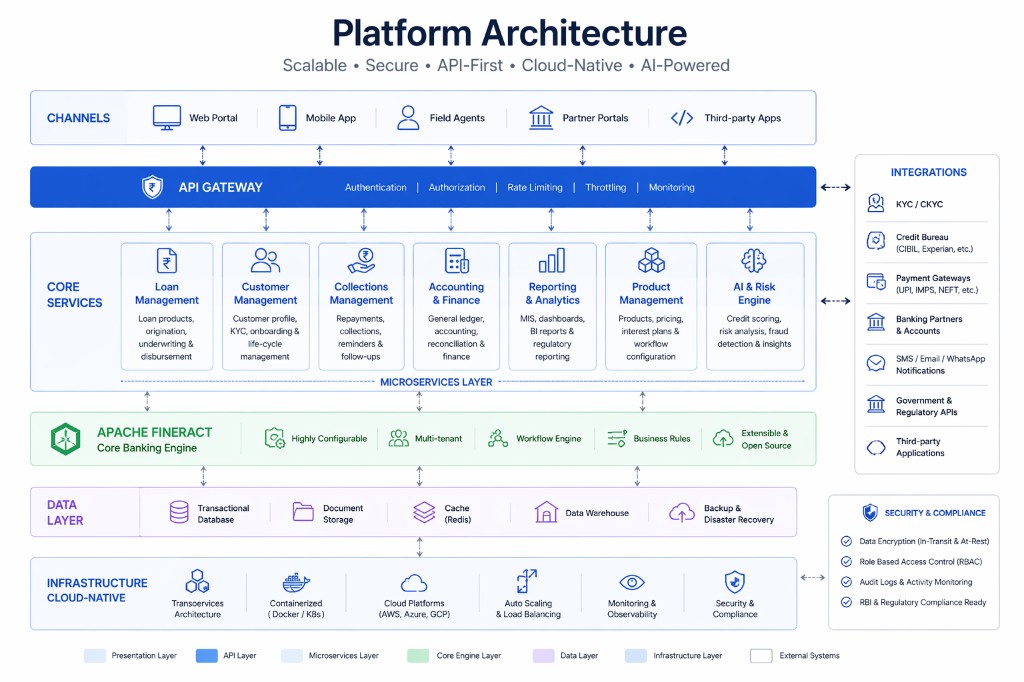
Mifos Upgrade Guide: Complete Step-by-Step Guide to Upgrading Your Mifos Core Banking Platform
Technology continues to evolve rapidly, and financial institutions must regularly upgrade their core banking platforms to remain secure, compliant, and competitive. Software upgrades introduce new features, improve system performance, strengthen security, resolve bugs, and ensure compatibility with modern infrastructure and third-party applications.
Mifos, powered by Apache Fineract, is continuously enhanced by its open-source community and implementation partners. Regular upgrades help financial institutions take advantage of these improvements while maintaining a stable, scalable, and future-ready banking platform.
However, upgrading a core banking system is a complex process that requires careful planning. Since Mifos manages customer records, loan portfolios, savings accounts, accounting data, and financial transactions, even a small upgrade mistake can affect business continuity.
A structured upgrade strategy minimizes downtime, protects data integrity, and ensures a smooth transition to newer software versions.
This guide explains every stage of a successful Mifos upgrade, including planning, compatibility assessment, infrastructure preparation, database migration, testing, deployment, rollback planning, and post-upgrade validation.
Organizations should first establish a stable implementation before planning major software upgrades.
Internal Link:
https://intelligrow.co/mifos-implementation/
Why Regular Mifos Upgrades Matter
Running outdated software increases technical debt and exposes organizations to unnecessary risks.
Regular upgrades provide several benefits:
- Enhanced Security
- Improved Performance
- New Features
- Bug Fixes
- Better API Support
- Improved Reporting
- Cloud Compatibility
- Regulatory Compliance
Organizations that postpone upgrades often face higher maintenance costs and increased implementation complexity in the future.
A proactive upgrade strategy helps maintain long-term platform stability.
Common Reasons to Upgrade Mifos
Financial institutions typically upgrade Mifos for one or more of the following reasons:
- Security Improvements
- Performance Enhancements
- New Banking Features
- Regulatory Changes
- API Improvements
- Infrastructure Modernization
- Cloud Migration
- Mobile Banking Support
- Database Compatibility
- User Experience Improvements
Understanding the business objectives behind the upgrade helps define project scope and priorities.
Phase 1: Upgrade Planning
Every successful upgrade begins with detailed planning.
Organizations should establish:
- Upgrade Objectives
- Project Scope
- Timeline
- Budget
- Technical Team
- Business Stakeholders
- Risk Management Plan
A dedicated project manager should coordinate upgrade activities across business and technical teams.
Phase 2: Version Assessment
Before upgrading, identify:
- Current Mifos Version
- Target Version
- Apache Fineract Version
- Database Version
- Java Version
- Operating System
- Third-Party Components
Review release notes carefully to understand:
- New Features
- Breaking Changes
- Deprecated Functions
- Security Updates
- Database Changes
Compatibility analysis helps prevent unexpected issues during deployment.
Phase 3: Infrastructure Assessment
Infrastructure should be reviewed before every upgrade.
Verify:
- Application Servers
- Database Servers
- Operating System
- Java Runtime
- Storage Capacity
- Network Configuration
- SSL Certificates
- Load Balancers
Organizations upgrading cloud environments should also review scalability and infrastructure performance.
Internal Link:
https://intelligrow.co/blog/mifos-cloud-deployment-guide/
Phase 4: Backup Strategy
Creating reliable backups is one of the most critical upgrade activities.
Always create backups of:
Database
- Customer Data
- Loan Data
- Savings Accounts
- Accounting Records
- Configuration
Application
- Source Code
- Configuration Files
- Custom Modules
- API Configuration
- Security Certificates
Infrastructure
- Virtual Machines
- Server Snapshots
- Cloud Images
Verify that backups can be restored successfully before beginning the upgrade.
Organizations should also maintain documented recovery procedures.
Phase 5: Review Customizations
Many organizations customize Mifos to support unique business processes.
Examples include:
- Loan Workflows
- Savings Products
- Reports
- Dashboards
- APIs
- User Interfaces
- Business Rules
Every customization should be reviewed for compatibility with the new version.
Organizations should identify:
- Deprecated APIs
- Database Changes
- Modified Business Logic
- User Interface Changes
Custom modules may require updates before deployment.
Internal Link:
https://intelligrow.co/mifos-development/
Phase 6: Database Upgrade
Database migration is one of the most sensitive upgrade activities.
Typical tasks include:
- Schema Updates
- Data Validation
- Index Optimization
- Stored Procedure Updates
- Performance Tuning
- Backup Verification
Organizations should always perform trial upgrades in a non-production environment before upgrading production databases.
Phase 7: API Compatibility Testing
Modern banking platforms integrate with multiple third-party applications.
Before production deployment verify compatibility with:
- Mobile Banking
- Payment Gateways
- CRM Systems
- ERP Platforms
- SMS Services
- Email Platforms
- Credit Bureau Services
- eKYC Providers
Testing should verify:
- Authentication
- API Responses
- Request Validation
- Error Handling
- Data Synchronization
Organizations using custom APIs should also review integration documentation.
Internal Link:
https://intelligrow.co/blog/mifos-api-integration-guide/
Phase 8: User Acceptance Testing (UAT)
User Acceptance Testing confirms that the upgraded platform supports real business operations.
Business users should validate:
- Customer Registration
- Loan Processing
- Savings Transactions
- Accounting Entries
- Reports
- User Permissions
- Branch Operations
- Workflow Approvals
Every critical business process should be tested before approving production deployment.
Common Upgrade Challenges
Organizations often encounter several challenges during Mifos upgrades.
Common issues include:
- Database Compatibility
- Legacy Customizations
- API Changes
- Performance Issues
- Integration Failures
- User Training
- Data Validation
- Infrastructure Configuration
Addressing these challenges during planning helps minimize project risks and deployment delays.
Internal Link:
https://intelligrow.co/blog/common-mifos-implementation-challenges/
Phase 9: Production Upgrade Process
Once testing has been completed successfully in the staging environment, organizations can begin the production upgrade. A well-defined deployment plan minimizes downtime and ensures business continuity.
Before starting the production upgrade, confirm that:
- Business stakeholders have approved the deployment.
- End users have been notified of the maintenance window.
- Complete backups have been verified.
- Rollback procedures are documented.
- Technical support teams are available.
- Monitoring tools are operational.
A deployment checklist should be followed throughout the upgrade process.
Step 1: Stop Business Transactions
Temporarily suspend production transactions to maintain data consistency.
Ensure that:
- Loan processing is paused.
- Savings transactions are stopped.
- Batch jobs are completed.
- Pending integrations are synchronized.
Step 2: Perform Final Backup
Create one final backup immediately before deployment.
Back up:
- Production Database
- Application Files
- Configuration Files
- SSL Certificates
- Custom Modules
Never begin an upgrade without verifying backup integrity.
Step 3: Deploy the New Version
Deploy the upgraded Mifos application according to the approved deployment plan.
Verify:
- Application Startup
- Database Connectivity
- User Authentication
- Branch Connectivity
- API Availability
- SSL Configuration
Organizations with customized deployments should also validate custom modules after installation.
Step 4: Execute Database Migration Scripts
Run all required migration scripts supplied with the upgraded version.
Validate:
- Schema Updates
- New Tables
- Modified Columns
- Index Creation
- Data Integrity
Monitor execution logs carefully for errors or warnings.
Step 5: Restart Services
Restart:
- Application Services
- Database Services
- API Services
- Scheduler Jobs
- Background Workers
Confirm that every service starts successfully before allowing users to log in.
Phase 10: Rollback Strategy
Even after extensive testing, unexpected issues can occur during production deployment.
Every upgrade project should include a documented rollback strategy.
Rollback planning should define:
- Recovery Team
- Decision Authority
- Maximum Downtime
- Rollback Timeline
- Backup Restoration Process
- Communication Plan
Rollback may be required if:
- Critical application failures occur.
- Database migration fails.
- APIs stop functioning.
- Business workflows fail.
- Severe performance degradation is observed.
A tested rollback plan minimizes operational disruption and protects business continuity.
Phase 11: Post-Upgrade Validation
After deployment, organizations should verify that all core banking functions operate correctly.
Business users should validate:
Customer Management
- Customer Registration
- Customer Search
- KYC Records
- Profile Updates
Loan Operations
Verify:
- Loan Applications
- Loan Approvals
- Loan Disbursements
- EMI Calculations
- Loan Repayments
- Loan Closure
Internal Link:
https://intelligrow.co/blog/mifos-loan-management/
Savings Operations
Verify:
- Savings Account Opening
- Deposits
- Withdrawals
- Interest Posting
- Account Statements
Internal Link:
https://intelligrow.co/blog/mifos-savings-module/
Accounting
Verify:
- Journal Entries
- General Ledger
- Trial Balance
- Financial Statements
Internal Link:
https://intelligrow.co/blog/mifos-accounting-module/
Reporting
Generate:
- Loan Reports
- Savings Reports
- Financial Reports
- Regulatory Reports
Ensure reports produce accurate and consistent information.
Internal Link:
https://intelligrow.co/blog/mifos-reporting-guide/
Phase 12: Performance Monitoring
Application performance should be closely monitored after every upgrade.
Monitor:
Infrastructure
- CPU Utilization
- Memory Usage
- Disk Space
- Network Traffic
Database
- Slow Queries
- Connection Pool
- Index Performance
- Replication Status
Application
- Response Time
- Login Performance
- API Latency
- Transaction Processing
- Error Logs
Continuous monitoring enables organizations to detect issues before they affect business operations.
Internal Link:
https://intelligrow.co/blog/mifos-performance-optimization/
Upgrade Best Practices
Organizations with successful upgrade projects generally follow these recommendations.
✔ Upgrade Regularly
Avoid skipping multiple software versions, as large version gaps increase complexity and upgrade risks.
✔ Always Test First
Never upgrade production without completing testing in a staging or test environment.
✔ Document Every Change
Maintain detailed records of:
- Configuration Changes
- Database Changes
- Customizations
- API Modifications
Documentation simplifies future upgrades and troubleshooting.
✔ Validate Integrations
After every upgrade, verify integrations with:
- Payment Gateways
- CRM Systems
- ERP Platforms
- Mobile Banking
- SMS Gateways
- Email Services
✔ Train Users
If new functionality is introduced, provide updated training for:
- Branch Staff
- Loan Officers
- Finance Teams
- Operations Teams
- System Administrators
Training improves adoption while reducing support requests.
Why Choose Intelligrow for Mifos Upgrades?
Upgrading a core banking platform requires specialized expertise in banking technology, software architecture, database management, and system integrations.
Intelligrow helps financial institutions execute seamless Mifos upgrades with minimal downtime and maximum reliability.
Our upgrade services include:
- Upgrade Planning
- Version Assessment
- Infrastructure Review
- Database Migration
- API Compatibility Testing
- Customization Review
- Performance Optimization
- Security Validation
- Production Deployment
- Rollback Planning
- Post Go-Live Support
Our structured upgrade methodology helps Banks, NBFCs, MFIs, SACCOs, Credit Unions, and FinTech companies safely adopt new Mifos releases while protecting business continuity.
Mifos Upgrade Checklist
| ActivityStatus | |
| Upgrade Objectives Defined | ☐ |
| Current Version Assessed | ☐ |
| Infrastructure Reviewed | ☐ |
| Backups Verified | ☐ |
| Customizations Reviewed | ☐ |
| Database Migration Tested | ☐ |
| API Compatibility Validated | ☐ |
| User Acceptance Testing Completed | ☐ |
| Rollback Plan Prepared | ☐ |
| Production Upgrade Completed | ☐ |
| Post-Upgrade Validation Completed | ☐ |
| Performance Monitoring Enabled | ☐ |
| User Training Completed | ☐ |
| Documentation Updated | ☐ |
Conclusion
Keeping Mifos up to date is essential for maintaining security, performance, compliance, and access to the latest features. A well-planned upgrade strategy helps financial institutions minimize downtime, protect customer data, and ensure uninterrupted banking operations.
Successful upgrades require careful planning, compatibility assessments, reliable backups, comprehensive testing, structured deployment, rollback preparedness, and continuous post-upgrade monitoring.
By following the practices outlined in this guide, Banks, NBFCs, MFIs, SACCOs, Credit Unions, Cooperatives, and FinTech companies can confidently upgrade their Mifos platform while reducing operational risks and maximizing long-term business value.
Partnering with experienced Mifos professionals further ensures a smooth upgrade process, enabling organizations to take advantage of the latest innovations without compromising stability or customer service.
Useful Internal Links
Mifos Implementation
https://intelligrow.co/mifos-implementation/
Mifos Development
https://intelligrow.co/mifos-development/
Mifos Consulting
https://intelligrow.co/mifos-consulting/
Mifos API Integration Guide
https://intelligrow.co/blog/mifos-api-integration-guide/
Mifos Security Best Practices
https://intelligrow.co/blog/mifos-security-best-practices/
Mifos Performance Optimization
https://intelligrow.co/blog/mifos-performance-optimization/
Mifos Reporting Guide
https://intelligrow.co/blog/mifos-reporting-guide/
FAQ
Frequently asked questions
Regular upgrades provide security patches, bug fixes, performance improvements, new features, API enhancements, and better compatibility with modern infrastructure, helping financial institutions maintain a secure and efficient core banking platform.
Related topics

Mifos
Microfinance Software Comparison: Complete Guide to Choosing the Best Platform
July 8, 2026
Mifos
Mifos vs Oracle FLEXCUBE: Complete Core Banking Software Comparison Guide
July 8, 2026
Mifos
Mifos vs Temenos: Complete Core Banking Software Comparison Guide
July 8, 2026
Mifos
Mifos vs Finacle: Complete Core Banking Software Comparison Guide
July 8, 2026
Mifos
Apache Fineract: Complete Guide to the Open Source Core Banking Engine
July 8, 2026
Mifos
Mifos Maintenance Best Practices: Complete Guide to Keeping Your Core Banking Platform Secure and Reliable
July 6, 2026
Explore Intelligrow
Related pages you may find useful
Products
Reading mifos-upgrade-guide — explore lending platform guides, product pages, and implementation resources across Intelligrow.